

Why Simple Frontend Tasks Become Complicated
A practical look at modern frontend complexity — and the frameworks that help us manage it.

(A refined write-up of my talk “The Evolution of Frontend System Design” from Web Directions 2025.)
Earlier this week, I gave a talk at Web Directions titled “The Evolution of Frontend System Design.” It was a fun session to deliver, and many people told me afterwards that the story about the “simple dropdown” really resonated with them. Quite a few developers said something along the lines of: “Yep… that’s exactly what happens to me at work.”
So in this issue, I want to share a clean written version of that talk — not just a transcript, but a slightly expanded version. I’ve refined some of the explanations, added a couple of frameworks I didn’t have time to cover on stage, and included a clearer structure so you can use this as a reference for your own work.
If you were at the talk, this will feel familiar. If you weren’t, think of this as the full story — with all the parts I would have added if I had more time on the conference clock.
Let’s dive in.
A “Simple” Component That Isn’t Actually Simple
Imagine you’re asked to build a user-select component. It starts off collapsed, and when you click it, it expands and shows a list of users. You’ve seen this pattern in many tools — Jira, Trello, GitHub Issues, Notion.
The first version looks easy. Fetch the users, store them in state, show the list. Add a loading state, add an error state — still simple.
But complexity shows up quickly in real products.
A customer with two thousand employees reports that opening the dropdown freezes the app. Rendering everything at once isn’t viable anymore. So you add pagination. And suddenly, you’re coordinating with backend changes, versioning concerns, or feature switches.
Then they ask for search. And search brings its own layers: debouncing, request cancellation, empty states, error handling, and combining search with pagination.
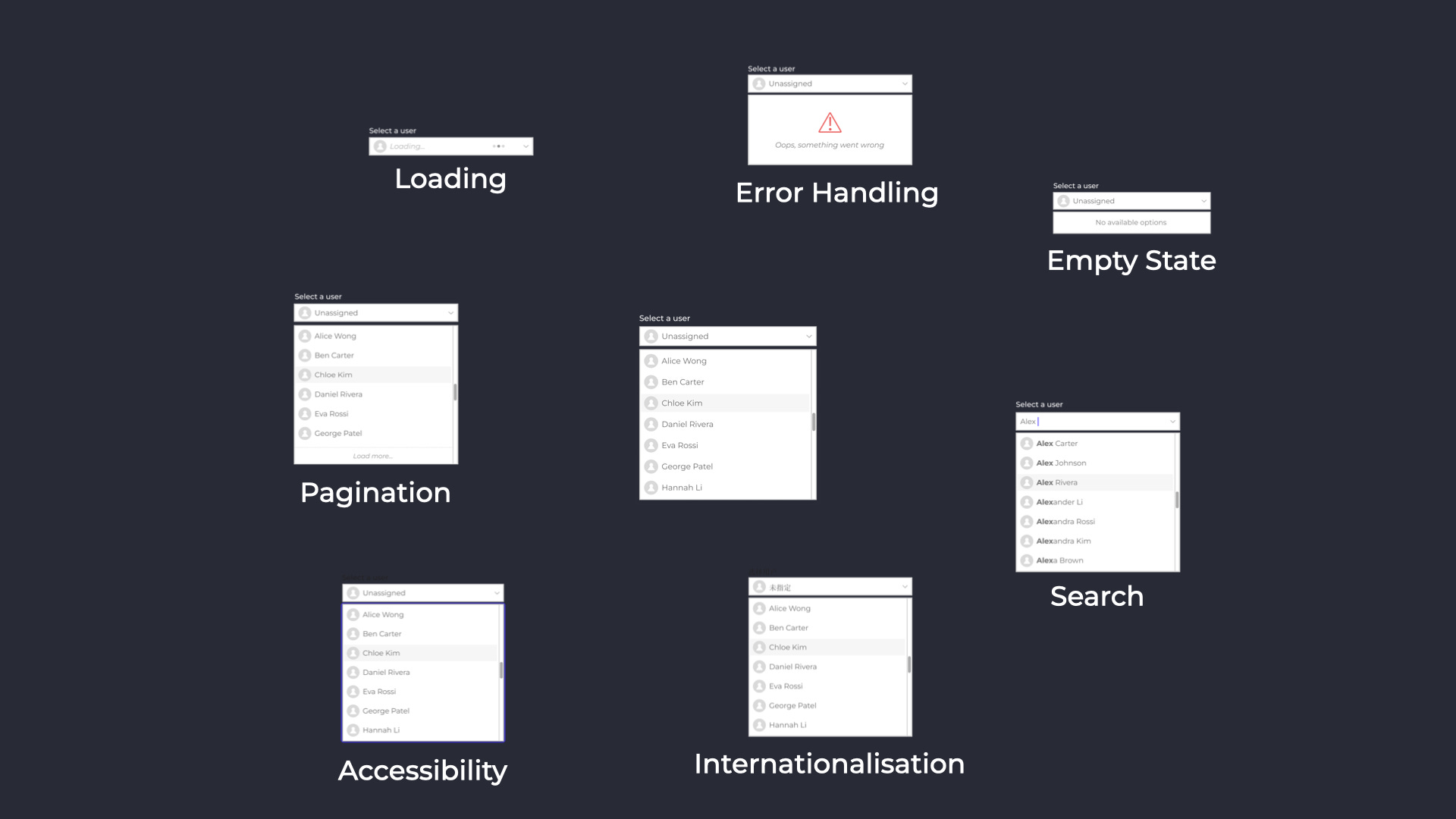
Accessibility arrives next. Keyboard navigation doesn’t work. Screen readers don’t announce highlighted items. Now you’re adding ARIA attributes, focus management, and testing interactions you previously didn’t think much about.
Then localisation. Some languages overflow the UI. Some wrap differently. Arabic needs right-to-left layout. Now your styles and layout logic evolve too.
And when you step back, you realise this “simple” dropdown now has loading logic, error boundaries, virtualisation, debounced search, pagination, accessibility layers, RTL support, and multiple network states.
Still “just a dropdown,” but in reality, a system of behaviours and constraints.
This is what I covered in the first half of the talk. And it illustrates the first kind of complexity we face in frontend — internal component complexity. Real requirements turn the happy path into something much deeper.
But that’s not the whole story.
A Small UI Change Can Trigger System-Wide Behaviour
Let’s zoom out.
Assigning a user to a card doesn’t just update the little avatar. It affects the card itself, the board view, the sorting logic, the sidebar counters, the activity feed, and any real-time views other people have open.
So the questions shift from UI to system coordination.
Should we update optimistically?
What if the server rejects the update?
What if someone else assigns the card at the same time?
How do we keep caches consistent across different parts of the UI?
This is the second type of complexity — system-level complexity.
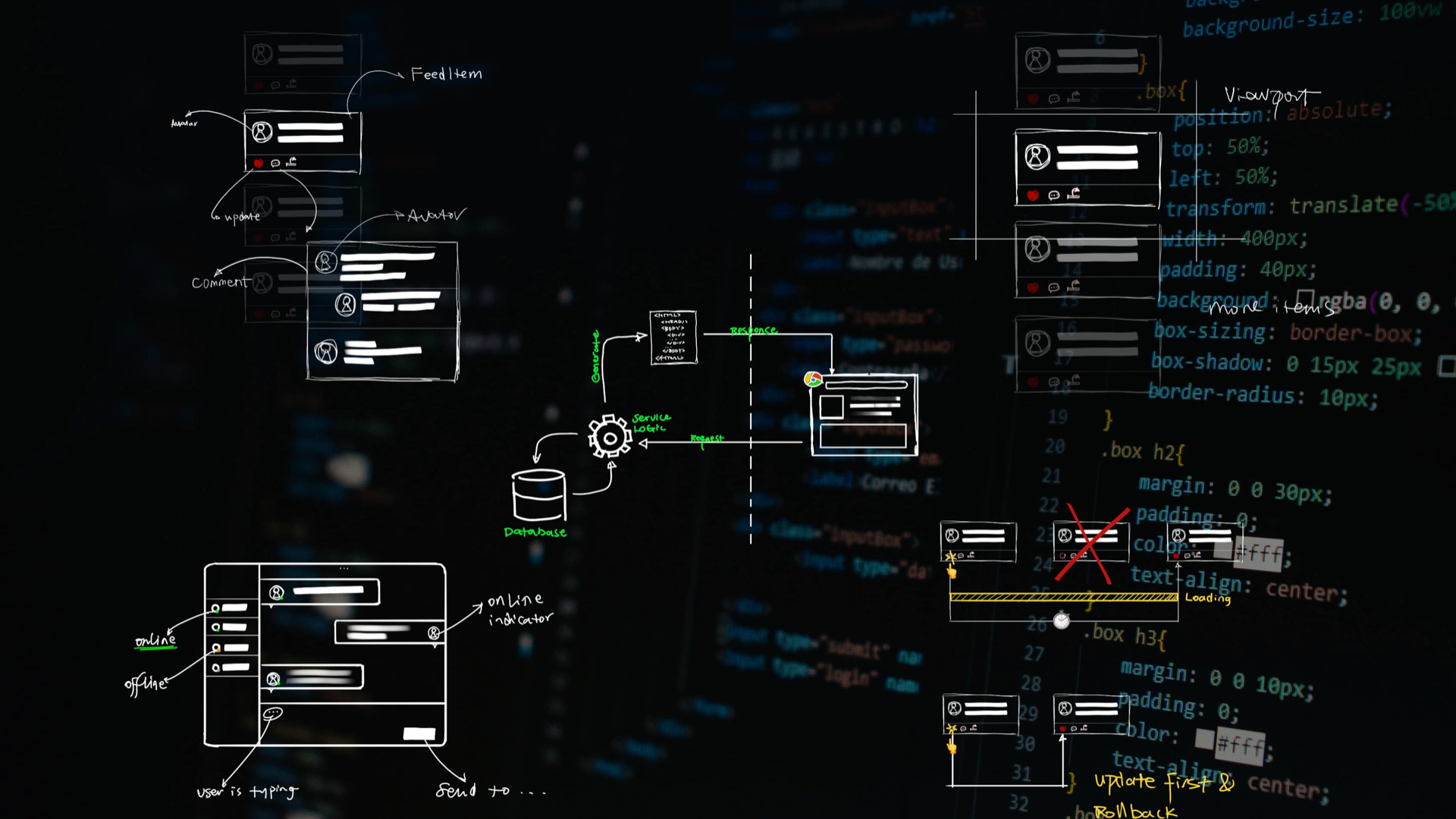
None of these problems belong to the dropdown component. They belong to the entire application. And they show up in every serious frontend project.
In the talk, I compared this to backend system design. When multiple parts of a system need to coordinate, architecture and boundaries start to matter. The same applies in frontend today.
A Simple Lifecycle Framework to Make Sense of Frontend
This is where I paused my talk on Wednesday and introduced a simple model to help people organise their thinking. I want to expand it here because it’s been one of the most helpful ways for me to understand frontend work over the years.
You can think of frontend through the lens of the application lifecycle:
Build time → Deployment time → Runtime
This framework helps you place each challenge in the right mental drawer.
Build time is where your code is transformed.
Bundlers, code splitting, SSR choices, static generation, types, tests — all the things that shape your application before it reaches users.
Deployment time is how your code gets delivered.
CDNs, caching, routing, compression, asset invalidation — the infrastructure that controls performance and reliability.
Runtime is where things get interesting. This is when the browser runs your code and users start interacting with it. And this is where most of the complexity appears — data fetching, caching, rendering, accessibility, localisation, concurrency, real-time updates, and error handling.
When a frontend task suddenly grows, it’s often because it spans multiple stages of this lifecycle. A UI change that seems purely visual may have runtime implications, caching implications, and deployment implications all at once.
This simple model doesn’t solve your problems, but it gives you a map — and a map reduces confusion.

The Framework I Use for Frontend System Design
During the talk, I briefly mentioned my Frontend System Design Essentials series. Here, I want to give you a clearer sense of the framework behind it, because this is how I personally break down complex frontend features.
At runtime, almost everything falls into a few predictable categories:
How you fetch data
How you model data
How you store and manage state
How you mutate data and handle conflicts or errors
How you render in a way that balances performance and clarity
How you handle cross-cutting behaviours like i18n, accessibility, real-time events, and loading strategies
Most frontend challenges can be explained by understanding which of these areas are involved, and how they interact.
When something feels unexpectedly complex, the framework helps you see why. And when you design a new feature, it helps you identify dependencies and risk earlier.
This is the part I didn’t have enough time to expand on during the talk, so I’m glad I get to share it here.

Closing Thoughts
Frontend used to be about manipulating the DOM. Today, it’s about building and coordinating multiple subsystems running inside the browser. That’s why tasks feel bigger than they initially look.
But with the right mental models, this complexity becomes manageable. You understand why features expand. You see how small UI pieces connect to larger systems. And you can diagnose problems more confidently because you know where they live.
If you were at the Web Directions talk, I hope this extended write-up gives you a deeper and more structured view of the material. If you weren’t, I hope it offers you a useful way to think about frontend work in your own projects.